
Appearance
HTTP Protocol
HTTP, or HyperText Transfer Protocol, is the main rule system that browsers and web servers use to talk to each other. It tells how a request should be asked and how a response should be given.
How it works
When you type a web address and press enter, your browser sends an HTTP request to the server: “Please give me this page.” The server answers with an HTTP response that includes the page content and some extra info (like status code 200 for OK, or 404 for not found). Every click, image, or video on the web is moved around using these requests and responsesAnalogy
 Think of a waiter in a restaurant who follows a strict script. You (the browser) place an order using certain words, and the waiter (HTTP) delivers that order to the kitchen (the server). Then the waiter brings back the food (the page). The important part is not the food itself but the way the waiter takes and delivers orders - that's what HTTP does for the web.
HTTP (HyperText Transfer Protocol) is the backbone of the web. Every time your browser loads a site, makes an API call, or fetches an image, it's happening over HTTP. At its core, HTTP works in a super straightforward way:
Client sends a request → Server sends back a response
That's it. But under the hood, there's a lot going on
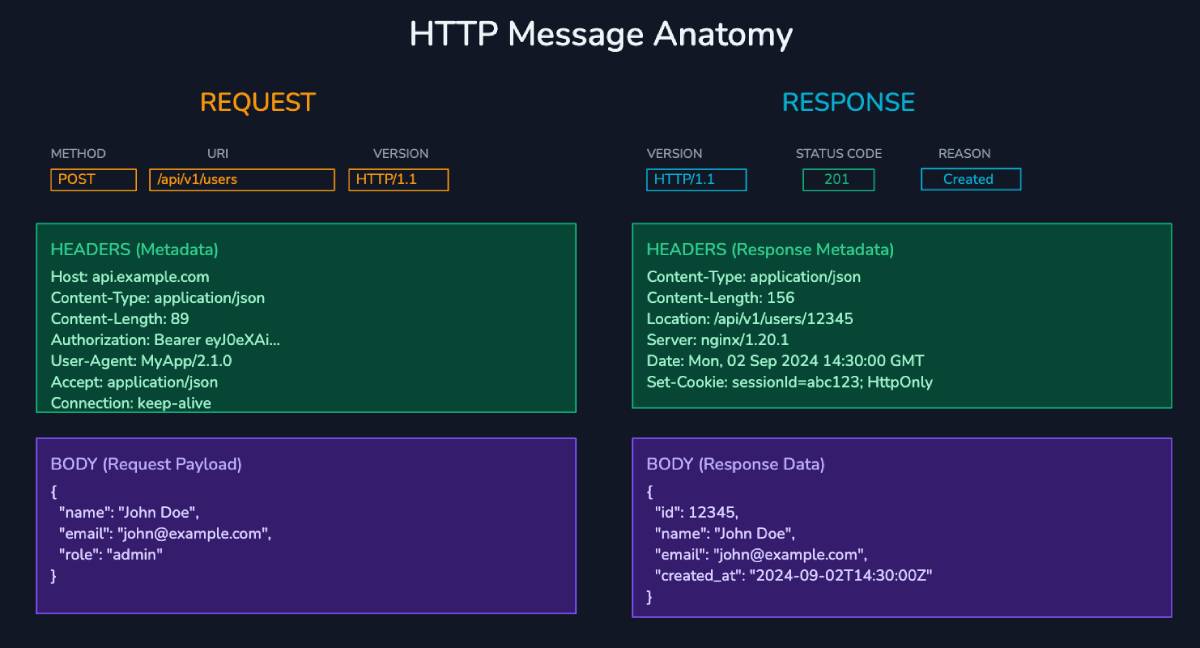
🔍 HTTP Message Structure
Every HTTP message (whether it’s a request or a response) has two parts:
- Headers – Metadata about the message (like content type, auth info, etc.)
- Body – The actual data being sent (optional; used in things like POST requests or response payloads)
🧠 HTTP Headers
Headers are the key-value pairs that carry extra info. You’ll use them all the time, whether to send cookies, define content types, or handle caching
Some common headers:
- Host – Tells the server which domain you’re trying to reach
- User-Agent – Info about the browser or client
- Content-Type – Type of the data being sent (e.g. application/json)
- Authorization – Used for passing auth tokens
- Cookie / Set-Cookie – Managing sessions and user data
- Cache-Control – Defines how responses should be cached
- Content-Length, Last-Modified, Referer, etc
🔧 HTTP Methods
These define what action you want the server to take:
- GET – Fetch data
- POST – Submit data (e.g. create something)
- PUT – Update/replace existing data
- DELETE – Remove data
Other less commonly used:
- HEAD, OPTIONS, PATCH, TRACE, CONNECT
🧾 Status Codes
The server always responds with a status code that tells you what happened. They’re grouped like this:
- 1xx – Informational
- 2xx – Success (e.g. 200 OK)
- 3xx – Redirection (e.g. 301 Moved Permanently)
- 4xx – Client errors (e.g. 404 Not Found, 401 Unauthorized)
- 5xx – Server errors (e.g. 500 Internal Server Error)
🔐 HTTPS
Same protocol, but encrypted using TLS. This is what keeps your data safe in transit. If you’re building anything on the web today, HTTPS is non-negotiable
🍪 Cookies
HTTP is stateless - it doesn’t remember anything between requests. Cookies are a workaround for this. They let the server store small bits of data on the client (like session IDs), which the client can send back with future requests
Cookies are widely used for:
- User sessions
- Tracking
- Storing preferences
🌐 CORS (Cross-Origin Resource Sharing)
By default, browsers block requests from one domain to another for security. CORS is a set of rules (implemented via headers) that tells the browser which domains are allowed to talk to each other
You’ve probably seen CORS errors when making API calls from frontend apps - this is what’s behind it
🛡 CSP (Content Security Policy)
CSP is a powerful HTTP header that helps prevent common web vulnerabilities like XSS (cross-site scripting). It lets you define which sources are allowed to load scripts, styles, images, etc.
Think of it as a whitelist for your site’s content
🚀 Evolution of HTTP
HTTP has been around since the early days of the web, and it’s gone through some serious upgrades:
- HTTP/1.0 – Simple, slow. One request per connection
- HTTP/1.1 – Introduced persistent connections and chunked responses. Still widely used
- HTTP/2 – Huge performance jump: multiplexing, header compression, binary format, server push
- HTTP/3 – Built on QUIC (UDP-based), better performance in flaky networks, faster and more secure